
Global

Mobile Legends: Bang Bang Global
0sold0.0
(0)
A fast-paced 5v5 MOBA featuring a diverse hero roster, engaging team strategies, and exciting competitive matches.
Choose Product

55 Diamonds
$0.78

Weekly Elite Pack
$0.79
86 Diamonds
$1.23
Weekly Pass
$1.52

165 Diamonds
$2.33
172 Diamonds
$2.44
275 Diamonds
$3.73
Monthly Elite Pack
$3.91

429 Diamonds
$5.95
355 Diamonds
$6.88
565 Diamonds
$7.64

Twilight Pass
$7.98

706 Diamonds
$9.54
570 Diamonds
$10.94
716 Diamonds
$13.76
1163 Diamonds
$24.70

1446 Diamonds
$27.42
2010 Diamonds
$31.70

2398 Diamonds
$49.40

3688 Diamonds
$54.89

5532 Diamonds
$79.47

9288 Diamonds
$137.31
Thông tin tài khoản
Related Products
Description Mobile Legends: Bang Bang Global
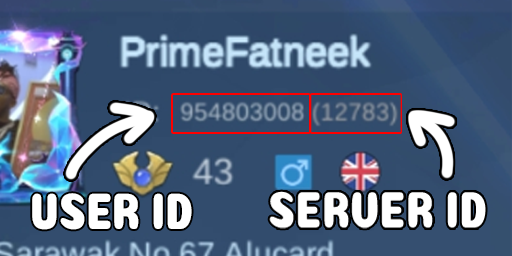
How to Find Your User ID & Zone ID in Mobile Legends: Bang Bang
- Open Mobile Legends: Launch the game and log into your account.
- Access Profile: Tap your Avatar in the top left corner of the main lobby.
- Locate User ID & Zone ID: Look below your nickname on your profile page. You will see your User ID followed by your Zone/Server ID in parentheses — for example: 123456789 (1234).
Comments & Reviews
- 50%
- 40%
- 30%
- 20%
- 10%
0.0
0 Total Reviews